
Mein Blog ist hauptsächlich über Nintendo DS Flashkarte, PlayStation3 und neueste Spiele.
Hi, zusammen,
Ich habe gerade gefunden, dass R4i Team eine neue Flashkarte erlässt hat, die speziell für Nintendo 3DS Spiel ist: R4i Gold Deluxe Edition. Deise R4i Karte funktioniert auf 3DS/3DSXL/3DSLL Konsole V4.1-4.5 und kann die neuste DSi, 3DS Games unterstützen. RTS (Real Time Save) für DSi Games, WiFi Games und DS Ramble Pak sind auch möglich. Außerfdem, durch die neuste Firmware 2.0 wird " Firmware Spoofing" und " Region Free" benutzt. "Firmware Spoofing" bedeutet, dass der Spieler die 3DS Spiele genießen, deren Version über die Version der Konsole ist, damit kann man neuste 3DS Games spielen. "Region Free" heißt, dass man die europänische, japanische, amerikanische oder andere regionale Games auch einwandfrei spielt.
In der Verpackung gibt es 2 Karte: eine Golde und eine Blaue und ein Kartenleser:

Und hier gibt es noch eine Installations-Anleitung über R4i Gold 3DS Deluxe Edition Flashkarte auf Englisch:
1. Format Micro SD card in Fat32. Download the newest Wood R4 kernel , and extract the “.rar” file to get two files below, and then copy them to the ROOT of the MicroSD card.

2. Insert the Micro SD card(Preloaded wood kernel) into the “Blue Card” and Running.
1) Click “START” of the WOOD Menu and choose “3DS Setup”;

2) Press button “B” to setup.
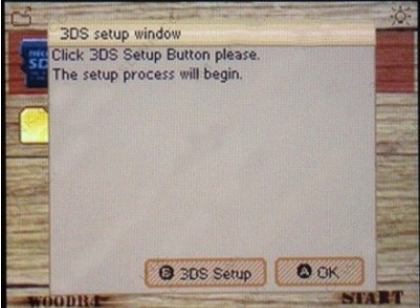
3) Press button “A” to power down or “Home” to return to main menu.

3. Extract the “Firm(3DS_Card).rar” and Copy “Launcher.dat” file to the ROOT of the SD card (for 3DS). And insert into the SD Card SLOT.
4. Launching “STARTER” mode (repeat every power cycle).

Wait for 5-8 seconds for system tore boot into “STARTER” mode
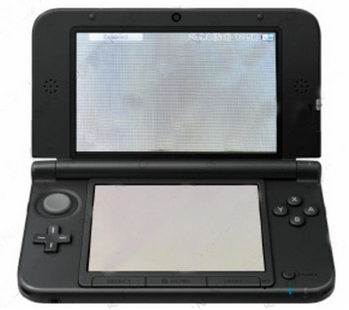
5. Preparing several MicroSD cards for the R4i gold 3DS deluxe edition
1) Please download “win32diskimager-v0.9-binary.zip” and Extract it.
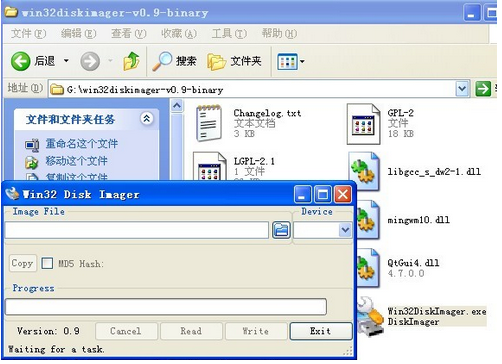
2) Start Win32 Disk Imager and select file open button, choose all file types to list .3DS and select your file.
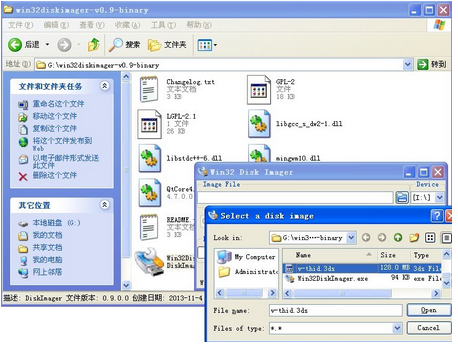
3) Insert MicroSD card larger than the file to be written into reader/writer.
Make sure to select the correct device in Win32 Disk Imager drop down list.
(Note: The MicroSD card needs to be preformatted in order to show up in the device list.)
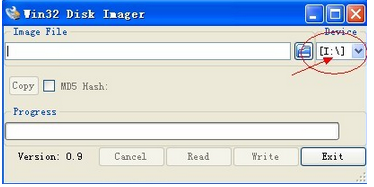
Select 3ds rom to Write (double check correct target device and yes to the pop-up confirm overwrite window.)


Done to exit. Insert MicroSD card into Golden STARTER card.
Make sure you are running in “STARTER” Mode as shown in Step 4.

Lastly, you will get the 3DS game icon and running it to enjoy!


/http%3A%2F%2Fwww.elespiel.com%2Fblog%2Fwp-content%2Fuploads%2F2014%2F04%2F20140401171533343_02.png)
/idata%2F4092002%2F023dskonloe.jpg)
/idata%2F4092002%2F20131212155333296.png)